
Managing your Apex Trader Funding Legacy accounts effectively involves understanding the billing structure, fees, and processes. This guide consolidates key information to help you navigate account setup, billing, and related questions seamlessly.
Monthly Billing Cycle: How It Works
At Apex Trader Funding, we operate on an automatic monthly billing cycle for your account subscriptions. Here’s what you need to know:
Automatic Renewal:
- Your account subscription renews automatically every month on the same day from the date you make your payment for either an Evaluation Account or a Performance Account, where a monthly fee is selected.
- The billing will continue as long as the account subscription is active, regardless of whether you pass or fail the account, until you choose to cancel. Please be aware that Performance Accounts will auto-cancel upon failure.
Account Status:
- Evaluation Accounts: If your Evaluation Account fails, the account subscription remains active. You can continue with the same subscription to test again without interruption.
- Performance Accounts: If your Performance Account fails, the account subscription is automatically canceled. You will need to create a new subscription to continue.
Balance Reset:
- Balances for Evaluation Accounts are not reset monthly unless the account fails before the renewal date. If an account fails, the balance is reset automatically at no extra charge.
Account Subscription Management:
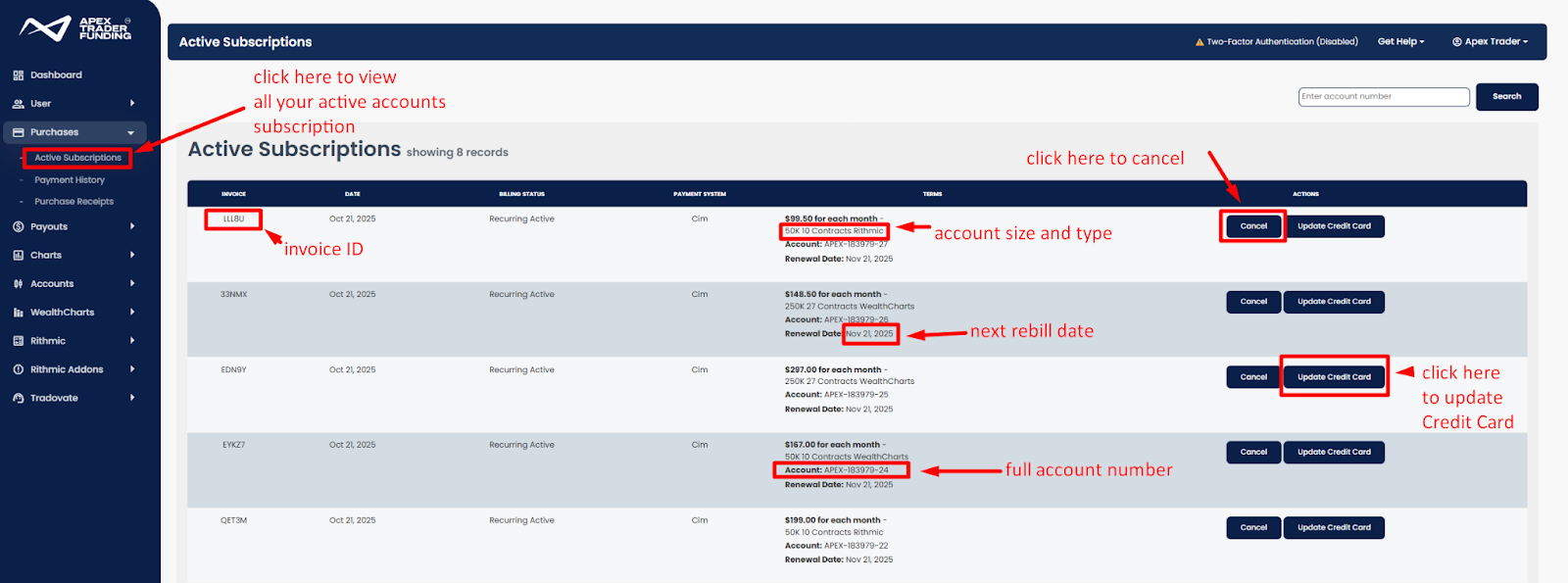
- You can manage your account subscriptions directly through the Apex dashboard to prevent unnecessary renewals or interruptions.
- Managing Subscriptions After Cancelation: If an account subscription is canceled, the account will remain active until the expiration date. To reactivate, you will need to start a new subscription. Visit this guide for help: Account Cancelation.
- Accessing Real-Time Data After Account Failure: For Rithmic accounts, real-time data remains accessible for 7 days after an account fails. Tradovate accounts lose real-time access within 24 hours. To restore access to data, you can either purchase a reset or create a new subscription. For more details, visit: Failed Renewals
Fees and Charges: A Transparent Breakdown
At Apex Trader Funding, we provide a clear and structured fee system to help you manage your trading expenses effectively. Here’s everything you need to know about the costs associated with your account subscriptions.
Initial Fees:
- The initial fee is determined by the plan you select. Each plan offers unique features tailored to different trading needs.
- For detailed pricing and plan options, please visit the Apex Trader Funding website.
Monthly Fees
Your monthly account subscription fee grants full access to your Evaluation Account and includes the following benefits:
- Performance Tracking: Monitor and evaluate your trading progress.
- Real-Time Data Feed: Access live market data, as long as your account is active.
- NinjaTrader Platform License Key: Trade seamlessly using one of the industry’s leading platforms.
No additional purchases are required to trade within your Evaluation Account, ensuring you have all the tools you need to get started.
Important Reminder:
- Failed Evaluation Account Subscriptions: These accounts do not automatically cancel upon failure. If you no longer wish to continue, you must manually cancel the subscription to avoid further charges.
- To learn more about managing failed accounts, visit Reset Options and Invoice Cancelations.
By understanding these fees and actively managing your subscriptions, you can focus on your trading journey without unexpected charges.
Add-ons and Optional Fees
In addition to the standard account subscription fees, traders have the option to purchase add-ons for enhanced data and trading features. Below is a detailed breakdown of the available optional fees for Rithmic and Tradovate users:
Optional Account Fees:
- Reset Fee: If you fail your Evaluation Account and wish to start over, a reset fee will apply. To learn more, visit Reset Options.
- PA Activation Fees: When you pass your Evaluation Account and transition to a Performance Account (PA), an activation fee applies. For detailed information about PA activation fees, refer to PA Account Fees and Payment Options.
Rithmic Add-Ons
Enhance your trading experience with optional Rithmic add-ons, such as market depth tools and additional login sessions. For a full list of available add-ons, their descriptions, and how to purchase them, visit our support guide: Rithmic Trading Tools & Add-ons.
Tradovate Add-Ons
Enhance your Tradovate account with optional data feeds, such as CME Bundle—Depth of Market (Level 2) and EUREX—Depth of Market (Level 2), which provide detailed Level 2 market data for these exchanges. For more information on available add-ons and how to purchase them, visit our support guide: Tradovate Trading Tools & Add-ons.
Renewal Billing: Everything You Need to Know
Managing your account subscription renewals with Apex Trader Funding is straightforward. Below are the key details and steps to ensure uninterrupted access to your accounts.
Billing Schedule:
- Billing occurs on the subscription start date and recurs monthly on the same day
- To check your next billing date, log in to your Apex Trader Funding Dashboard, which displays all active subscriptions and renewal dates.
- Separate invoices are generated for each paid or funded account subscription.
Balance and Drawdown:
- Your cash balance and drawdown carry forward each month unless your account is in a failed status.
- Failed Accounts:
- Accounts in a failed status are automatically reset at no extra cost during the renewal process.
- To qualify for this reset, the Evaluation Account must fail before 5 PM ET on the trading day before the invoice renewal date. Otherwise, the account will not be reset, and balances will remain unchanged.
- Failed Accounts:
Failed Renewals
At Apex, we strive to ensure a seamless experience for all our users. To support you in maintaining uninterrupted access to our services, we offer a 72-hour grace period for any failed renewal payments. This generous timeframe provides ample opportunity to update your payment details or manually renew your account, ensuring that your services continue without disruption. If the subscription is not renewed after the grace period, it will be terminated, including all profits and passed evaluations.
What Happens During the 72-Hour Grace Period?
If a renewal payment does not go through, you will have three days to address the issue. During this period, you can:
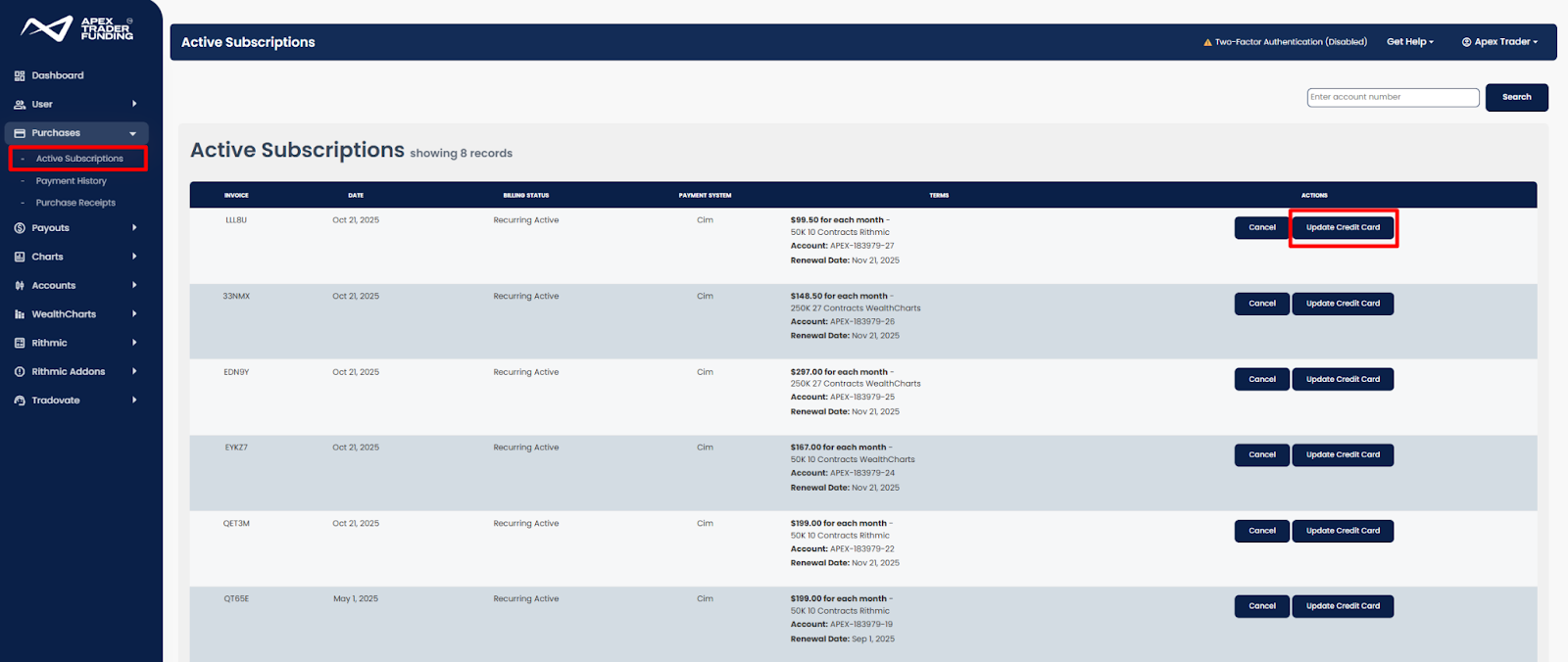
- Update Your Payment Information: Easily change your credit card details to ensure future payments are processed smoothly.
Payment Method: Ensure your credit card information is up to date to avoid disruptions in the renewal process.
- Missed Invoices: If an invoice renewal fails, you can manually renew it by:
- Logging into the Apex dashboard.
- Navigate to the Payment History section.
- Locate the failed invoice and click Manually Renew.
- Manually Renew Your Account: Take control of your renewal process to avoid any service interruptions by following the instructions outlined in this article HERE.
Important Note on Credit Card Information
When you manually renew your account using a different credit card, especially for accounts on CIM_2 (secure credit card processor 3), the new card information will become the default for all future renewals on that platform. To ensure accuracy and avoid any unintended charges, please remember to update your credit card information after performing a manual renewal if necessary.