
Resetting Your Legacy Evaluation Account
When to Reset
If your legacy evaluation account becomes inactive because you’ve broken a rule or you are trading close to the drawdown limit, you can choose to reset it. Resetting allows you to start fresh with a full balance, full trailing drawdown, and zero days traded.
How to Reset
To reset your account:
- Close All Positions: Before initiating a reset, ensure that all open positions are closed.
- Purchase a Reset:
- Log In: Access your members’ area here.
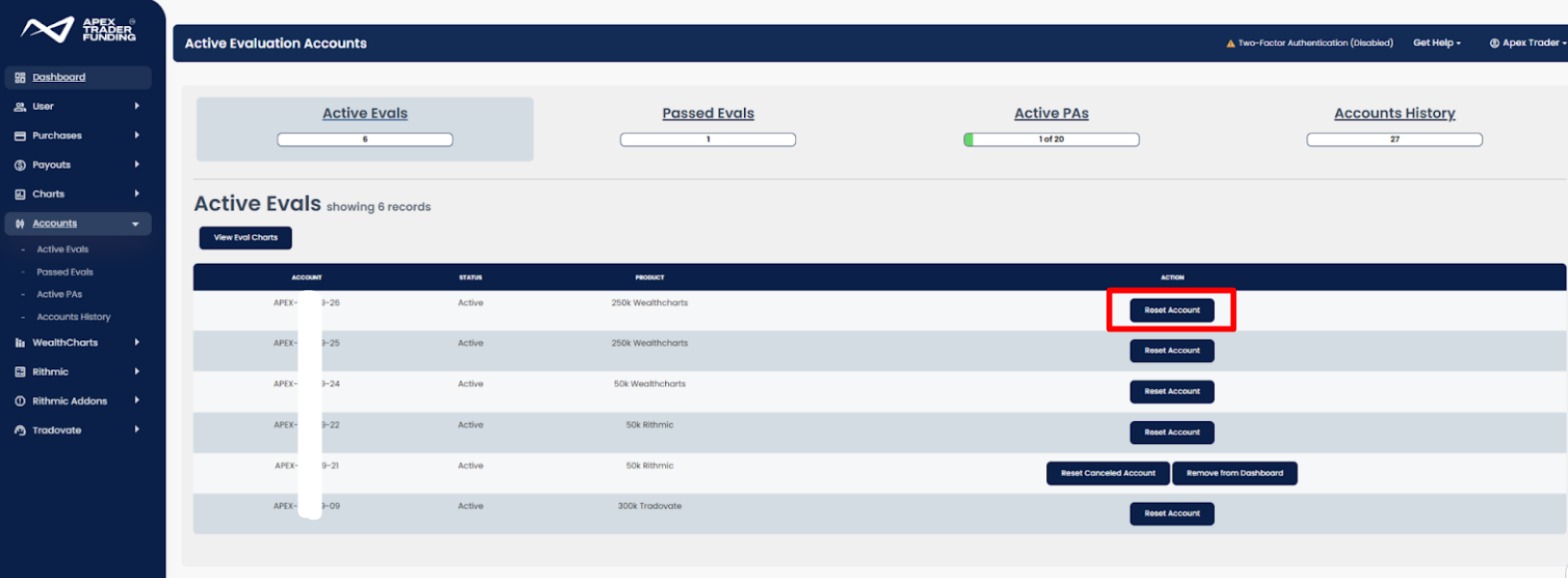
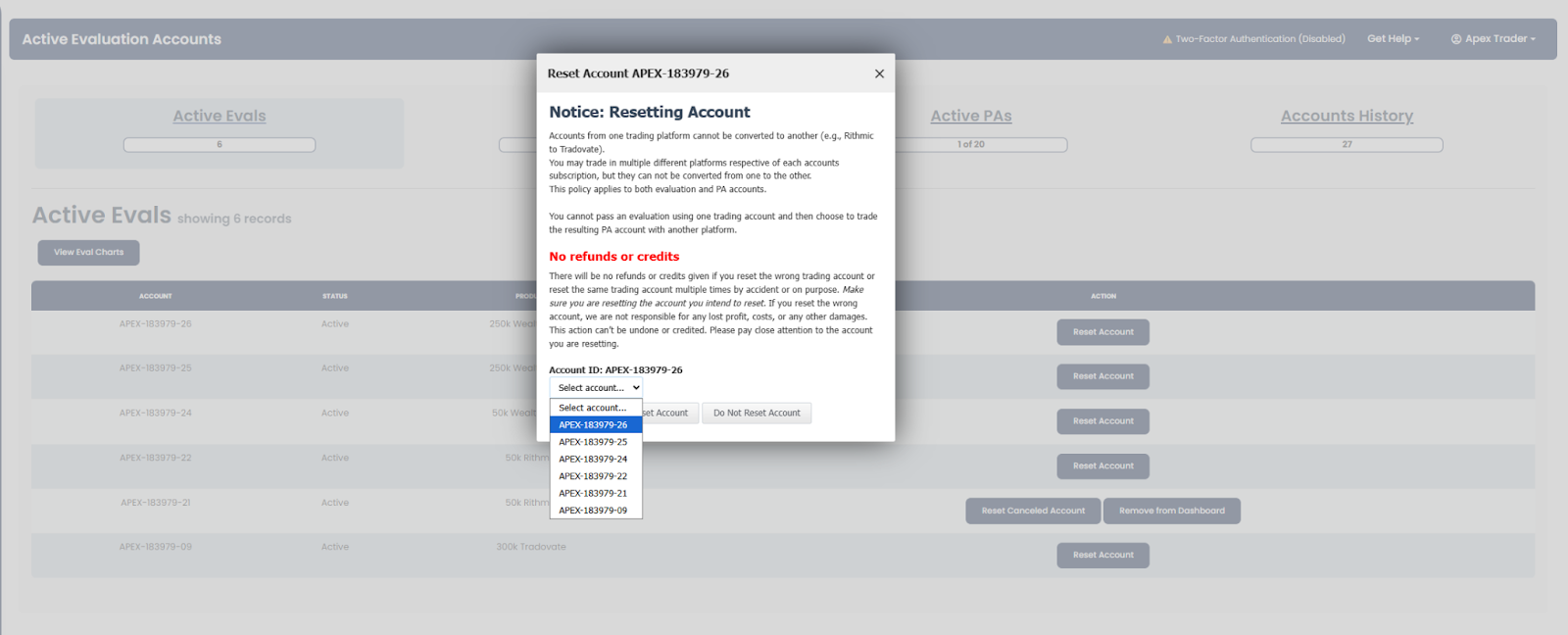
- Go to Active Evals or Account History, then click Reset next to the account you wish to reset.
- Warning: Make sure you reset the correct account, as this action is irreversible.
- Processing Time: The system typically processes resets within 10 minutes, but processing times may vary.
Important Notes on Resetting
Understanding how resets work is essential for managing your Apex Trader Funding accounts effectively. Below are the key guidelines and considerations to keep in mind when resetting an account:
Renewal Date Unchanged
- Resets do not extend your renewal or expiration date.
- Your renewal date remains exactly 30 days from the last billing date, regardless of resets.
Resetting a Canceled Evaluation Account
- If your Evaluation Account was canceled but is still within the subscription period, it can be reset manually to restore its balance and parameters.
- Resets do not reactivate canceled subscriptions or change renewal dates.
- Important: If an Evaluation Account is canceled, it must be converted to a Performance Account (PA) within the 30-day rebill period. Once the rebill date passes, the account can no longer be converted to a PA.
Refund Policy
- No Refunds: Reset fees are non-refundable, even if the reset was made by mistake.
Resetting Passed Accounts
- DO NOT reset a passed account.
- This action is irreversible, and you will permanently lose any progress made.
- If you reset a passed account, you will need to start over with a fresh balance.
Impact of Resetting
- A reset will restore:
- Your drawdown.
- Your initial balance.
- Your accumulated trading days.
- However, a reset does not change your renewal date.
Resetting The Same Account Multiple Times
- If you reset an account (e.g., APEX-12345-12) and it generates a new account number (e.g., APEX-12345-13), then reset it again to APEX-12345-14 without taking any trades on account -13, you will not be eligible for a refund. This is considered a user error.
- To Avoid Issues:
- Always ensure you have traded and failed on the previous account (e.g., -13) before resetting.
- Keep track of which accounts you have traded and failed to avoid resetting an unused account.
No Penalty for Resetting
- You can reset your accounts as many times as needed without any penalties.
By following these guidelines, you can effectively manage your resets while avoiding common mistakes. Always track your accounts carefully and ensure you’re adhering to these rules to avoid unnecessary complications.
Our Policy on Resets Upon Monthly Auto-Renewal
Apex Trader Funding’s reset policy is designed to simplify the process for traders and minimize unnecessary fees. If your Evaluation Account fails and you forget to cancel your subscription, a free reset will be applied automatically upon renewal as part of the renewal fee, provided certain conditions are met. This guide explains the process and helps you manage resets effectively.
Conditions for Free Reset Upon Renewal
- Account Status: To qualify for the free reset, the account must be in failed status as of the market close for the Trading Day prior to the renewal date (be mindful of CME Holidays and early market closes, these do not count as trading days unless otherwise specified by the CME here).
- Successful Renewal Fee: The subscription renewal fee must be successfully charged. The free reset applies only when the renewal payment is processed.
- Automatic Process: The reset will happen automatically after the renewal. No action is required on your part.
Options Before Renewal
If you don’t want to wait for the automatic reset, you have two alternatives:
- Manual Reset: You can manually reset your account before the renewal date by paying the reset fee ($80 for Rithmic & WealthCharts accounts / $100 for Tradovate accounts).
- Cancel and Sign Up for a New Account: You can choose to cancel your current account subscription and sign up for a new one. This prevents you from being charged for both a renewal and a reset fee, especially if you wish to take advantage of any available discount promotions.
Important Considerations
- No Retroactive Resets: If you reset your account manually before the renewal date and then it renews, you will not receive a refund for the reset fee.
- Evaluation Accounts Only: This policy applies exclusively to Evaluation Accounts. Performance Accounts (PAs) are not eligible for resets.
- Subsequent Failures: If your account fails again after the reset, it will not be reset for free unless it renews while in a failed status.
- Multiple Resets: Resets are only free upon renewal when the account is in a failed status. If you fail an active account and reset it, additional resets will require payment.
- This policy is designed to assist traders who might forget to cancel their accounts and sign up for new ones with available discount promotions. By automatically resetting failed accounts upon renewal, traders avoid having to pay both a renewal fee and a reset fee.
Overview Guide to Manage Resets
Reset Scenario Overview
| Scenario | Action |
|---|---|
| Failed Account at Renewal | Automatic reset is applied upon successful renewal. No action is required. |
| Need Immediate Trading Access | Perform a manual reset by paying the reset fee. |
| Account Cancelation | Cancel and open a new account to take advantage of discounts. |
| Avoid Renewal Charges | Cancel the account before the renewal date if you do not wish to continue the subscription. |
Reset Feature Overview
| Feature | Details |
|---|---|
| Free Reset Conditions | Failed account + Successful renewal fee. |
| Manual Reset Fees | $80 (Rithmic & WealthCharts) or $100 (Tradovate). |
| Applicable to | Evaluation Accounts only. |
| Renewal Date Impact | Resets do not extend the billing cycle. |
| Refund Policy | No refunds for manual resets, even if a renewal occurs. |
| Multiple Reset Policy | Free resets only upon renewal if the account is in a failed status. |