
Rithmic RTrader Pro Settings
- Open your RTrader Pro application
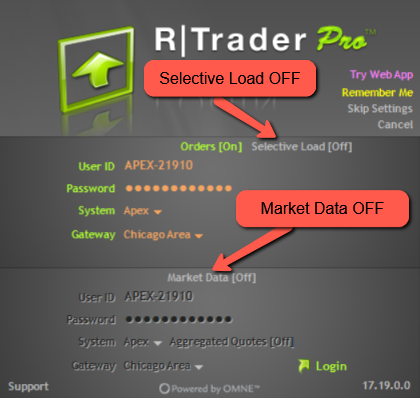
- Click “Skip Settings” (top right corner).
- Leave selective mode turned OFF.
- Copy and paste your Rithmic ID and password with no accidental spaces.
- Your Rithmic ID and password are stored HERE.
- Choose System: APEX.
- Choose Gateway: Chicago Area.
- Leave market data OFF.
- When you first log in to RTrader Pro, click LOGIN and sign the two (2) agreements for ALL NEW USERS.
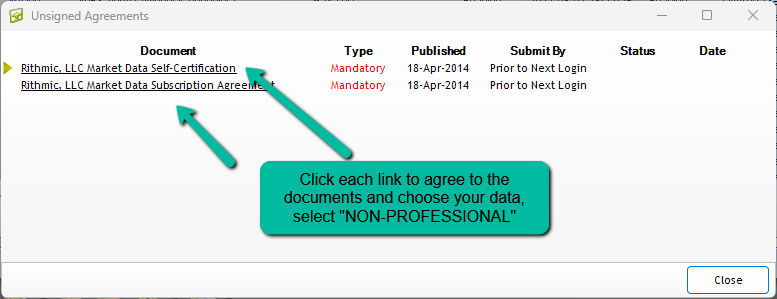
- These are mandatory. Select NON-PROFESSIONAL.
Rithmic Connection Guides Links
- NinjaTrader Connection Guide and Steps
- Connection guide link for ATAS and Rithmic
- Connection guide for connecting BookMap to Rithmic
- Connection guide link for EdgePro X and Rithmic
- Connection guide link for Finamark and Rithmic
- Connection guide link for Jigsaw and Rithmic
- Connection guide link for MotiveWave and Rithmic
- Connection guide link for Quantower and Rithmic
- Connection guide link for Sierra Chart and Rithmic
- Connection guide link for VolFix and Rithmic
- Connection guide link for DeepCharts and Rithmic