
Apex Trader Funding offers two main account types: Personal/Business User Accounts and Trading Accounts. Before signing up as a person or business, please read the following information on both account types HERE.
Personal User Accounts
A Personal User Account is created when you first sign up to purchase a subscription or join as an Affiliate (or both). This refers to the Apex Dashboard, where you can find your user profile, which is your account assigned to the email you log in with.
- One Account Rule: Each person is allowed to create only ONE Personal User Account for personal use. This account provides access to the trader dashboard, affiliate resources, evaluation purchases, PA account payments, affiliate links, and more.
- Creating a Business User Account: If you wish to trade through a business entity, you may also create a User Account for that business. To set up a Business User Account, you’ll need to provide the business’s EIN, along with potential additional documents to verify the business organization, if required. You are permitted ONE Personal User Account and ONE Business User Account.
- Important: Creating multiple personal or business User Accounts beyond the allowed limits is a violation of Apex Trader Funding’s policy. Any additional accounts will be closed, and any profits or affiliate commissions from those accounts will be forfeited.
To remain compliant, remember that each person may only have ONE Personal User Account and ONE Business User Account. Accounts cannot be transferred from one APEX login to another APEX Login.
Business Accounts
If you intend to trade through an LLC or register as a business, you must select this option when you sign up for your evaluation account.
We allow traders to set up a business account as long as the entity is solely owned and controlled by the trader. Eligible U.S. business entities that meet these criteria include Sole Proprietorships, Single-Member LLCs, and S Corporations with a single or sole 80% shareholder or similar international business models.
These entities must have the trader as the sole owner and operator, without any additional members, partners, or shareholders. For verification, traders will need to provide documentation confirming the entity’s structure and ownership, such as an operating agreement, Articles of Organization, or a similar official document that reflects sole ownership.
Key Points for Business Accounts:
- A Personal User Account cannot be converted to a Business User Account. You must sign up for the evaluation directly under the business for the funded account to be associated with it.
- A Personal User Account cannot be paid out to a Business Bank Account, and vice versa.
- The registered name on a paid or funded account cannot be changed after registration. Double-check that all details are correct before signing up.
How to Register as a Business or LLC/Corp:
- To properly register as a Business/LLC, click on the Sign Up button on the homepage.
- Then select an account size for the platform that you wish to trade with.
Please keep in mind:
- Creating accounts in an attempt to bypass any account restrictions, including probation standards, live trading environment assessments, or any other special account supervision, is strictly prohibited. Please note that this rule also applies to creating new user accounts within the same household. Any attempt to circumvent this rule will result in the immediate termination of all connected user accounts.
- Once registered as a personal account, it cannot be changed to an LLC or business account later.
- The registered name on your account cannot be changed after setup for both evaluation and funded accounts.
New Registration Steps for Business/LLC Accounts:

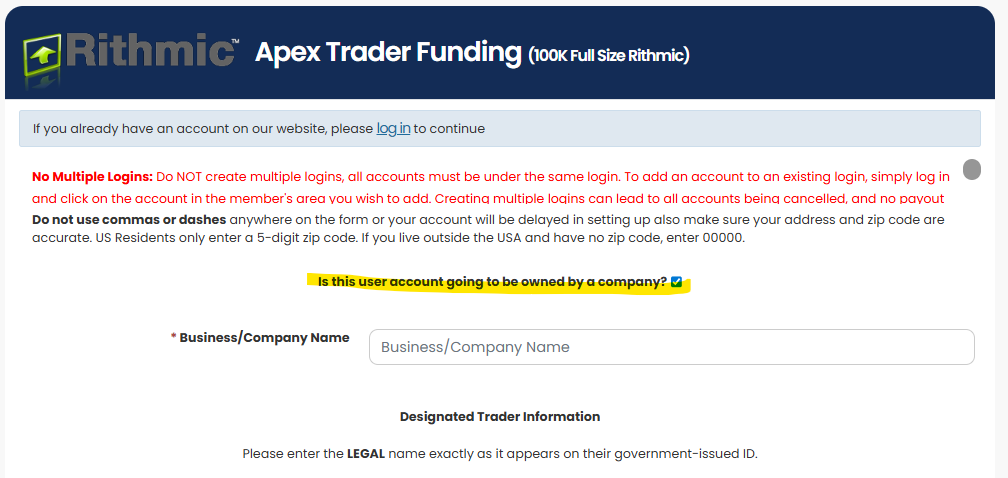
- On the sign-up page, check the box: “Is this user account going to be owned by a company?”
- Enter your Business/Company Name in the provided field.
- Under Designated Trader Information, enter your LEGAL name exactly as it appears on your government-issued ID. This name must also be the same person who owns 80% or more of the business, as stated above.
- Address and Phone Number: Use your business details here.
- Payment: You’ll need to use your business credit card for all evaluations and PA Fees.
If you’d like to maintain both personal and business accounts, please note that the total PA account limit per address across both is 20 PA accounts total.
Policy on Account Ownership and Corporate Eligibility:
- Our company strictly accepts single-user accounts for both individuals and corporations.
- For corporate accounts, only the majority shareholder—defined as an individual owning 80% or more of the company—can be the registered trader on the account.
- No other individuals, employees, or shareholders may trade on behalf of the corporation.
- Any change in ownership that results in the majority shareholder holding less than 80% of the company will be considered a violation of this policy. If this occurs, the account will be deemed in breach of our terms and will be forfeited immediately without refund or recourse.
- Shared accounts, multiple-user access, or third-party trading are strictly prohibited.
- This policy ensures compliance, security, and a fair trading environment. If you have any questions, please contact our support team.
IMPORTANT NOTES:
– The maximum number of PA accounts for one user is still 20 accounts. This means that you CANNOT have 20 PAs in your personal name and 20 under your business entity.
– Being classified as a “professional” may result in additional exchange fees for you or your entity. For example, fees will be at least $115 per month for just CME professional data. Other additional exchange fees may apply.
– Please thoroughly read the terms to see if you qualify as a professional or a non-professional trader status. Note: Most traders/LLCs are not professional traders.
Can churches, charities, or non-profits open an account?
No. Apex accounts are available only to individual and for-profit business customers. Churches, charities, and other non-profit or tax-exempt organizations aren’t eligible to open or maintain accounts. These organizations operate under different legal and financial rules, and our account verification process is designed for individuals and standard business entities.