
Welcome to your User Dashboard. This article outlines each of the tabs and pages found throughout the dashboard for the purpose of managing your Apex Trading Accounts, Subscriptions, and Payouts.
Eval/PA Charts
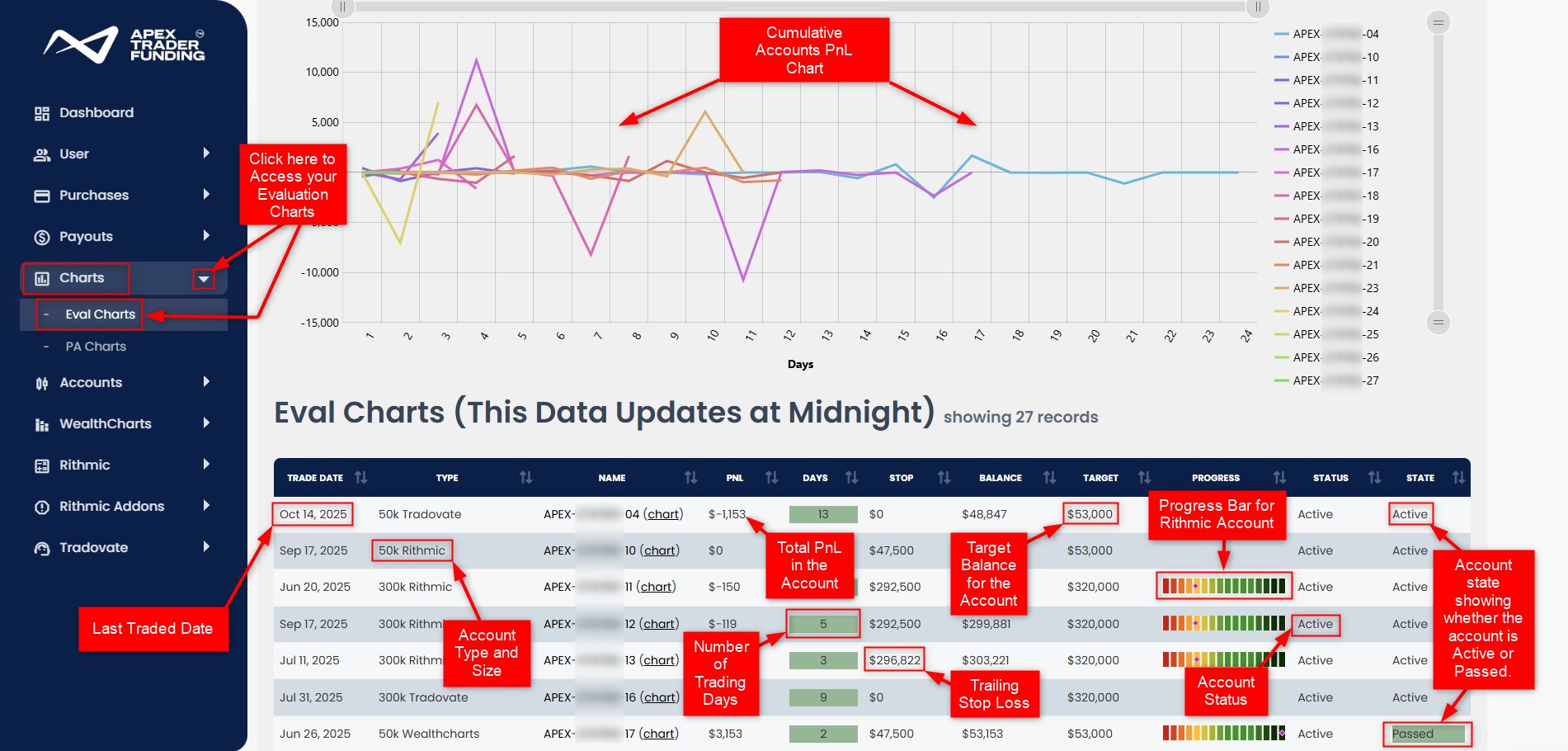
Our Evaluation and PA Charts provide a clear visual overview of your trading performance and account status. The Eval Charts or PA Charts sections in the sidebar on the left-hand side are where you access these detailed graphs and tables.
At the top, you’ll see a cumulative Profit and Loss (PnL) chart, which shows how your account’s profits or losses have changed over time, measured in trading days.
Directly underneath, each row of the table displays key account metrics updated nightly at midnight ET. These include your most recent trade date, account type, total PnL, and the number of trading days completed. You can also see critical thresholds such as the trailing stop (maximum allowed drawdown), current account balance, target profit levels, and an easy-to-read progress bar that visually indicates how close you are to reaching the goals or potential breaches. The trailing stop value is displayed only for WealthCharts and Rithmic accounts; for Tradovate accounts, this field will always display as $0.
Finally, the status and state columns inform you if the account is active, or passed, ensuring you always know exactly where you stand in your Evaluation or PA journey.
Eval Charts Breakdown
PA Charts Tutorial
Accounts Section
Passed Evals
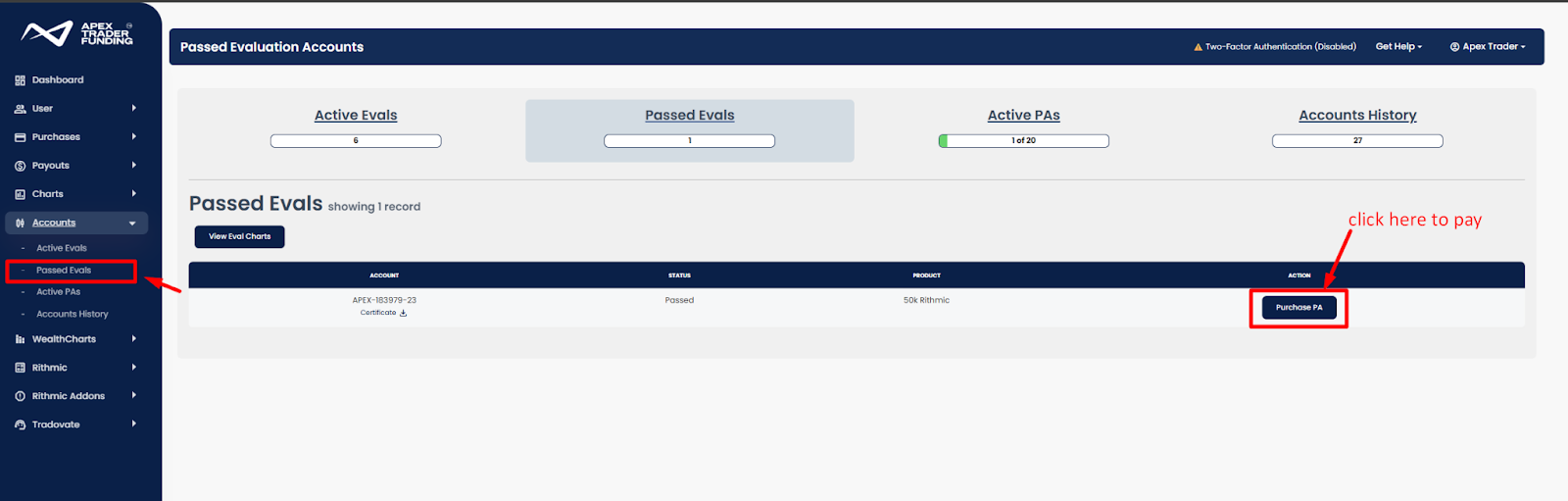
The Passed Evals tab in your Apex Dashboard streamlines the process of completing payments for your funded accounts.
When you open this section from the sidebar menu, you’ll see a list of your accounts. Each account entry includes a link to purchase a PA. Beneath your account number, there’s also a link that allows you to download the certificate for your passed account. In the product column, you’ll see the size of each account (for example, “50k Rithmic”).
Account Details
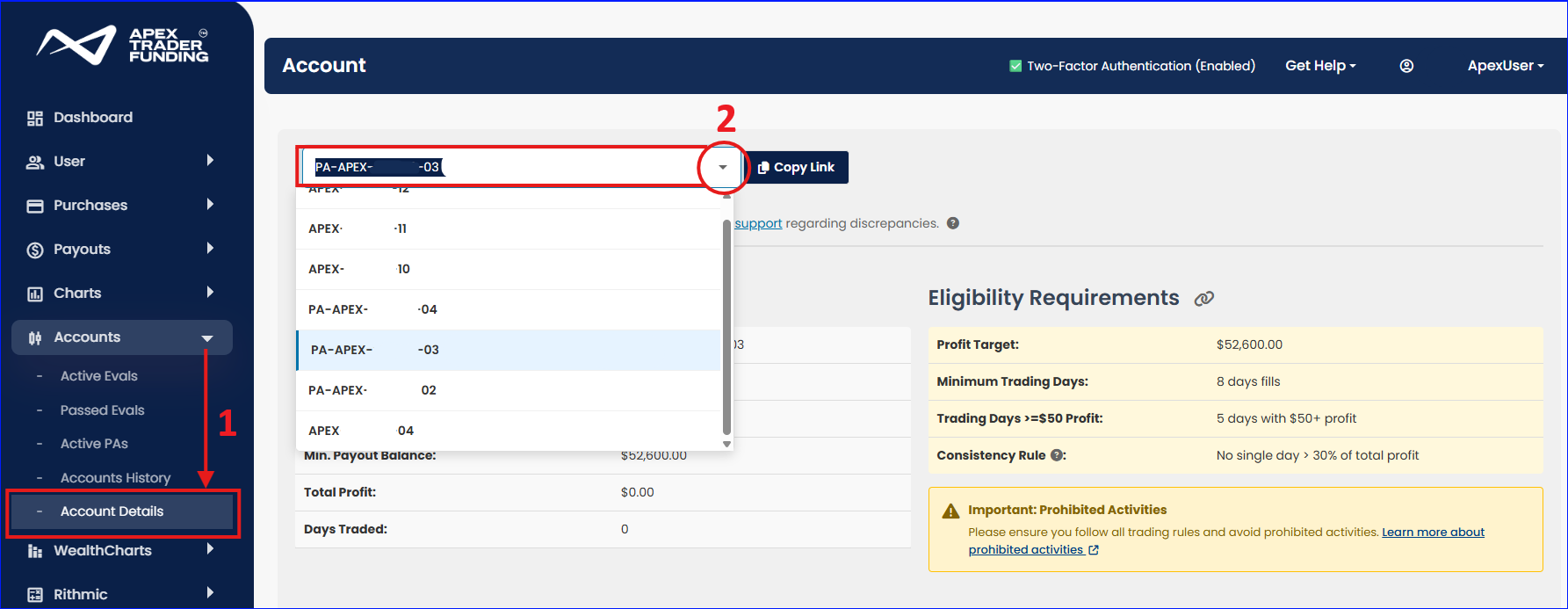
The Account Details tab can be found under the Accounts dropdown menu (point 1 in the image below). This section will provide you with an account summary and trading details for each of your active accounts. These details will allow you to better track your requirements for passing evaluations and meeting payout eligibility requirements.
To see details for a specific account, you can select the account from the dropdown (point 2 in the image below).
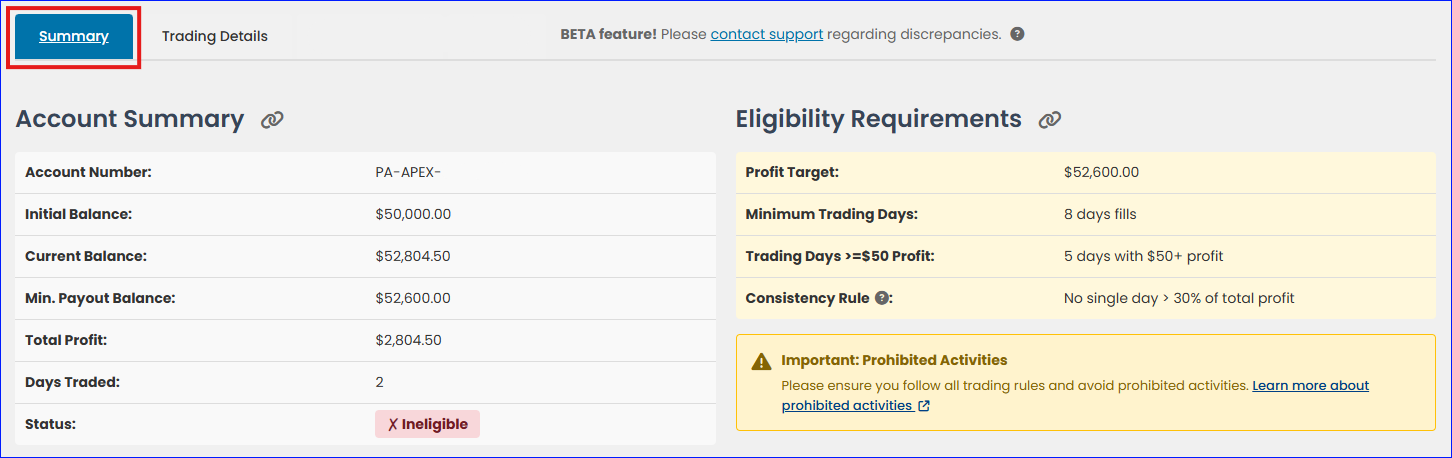
Once an account is selected, you can use the Summary tab to see information on the account size, current balance, total profit, days traded, and the payout eligibility and requirements on a PA, or the profit target for Evaluations.
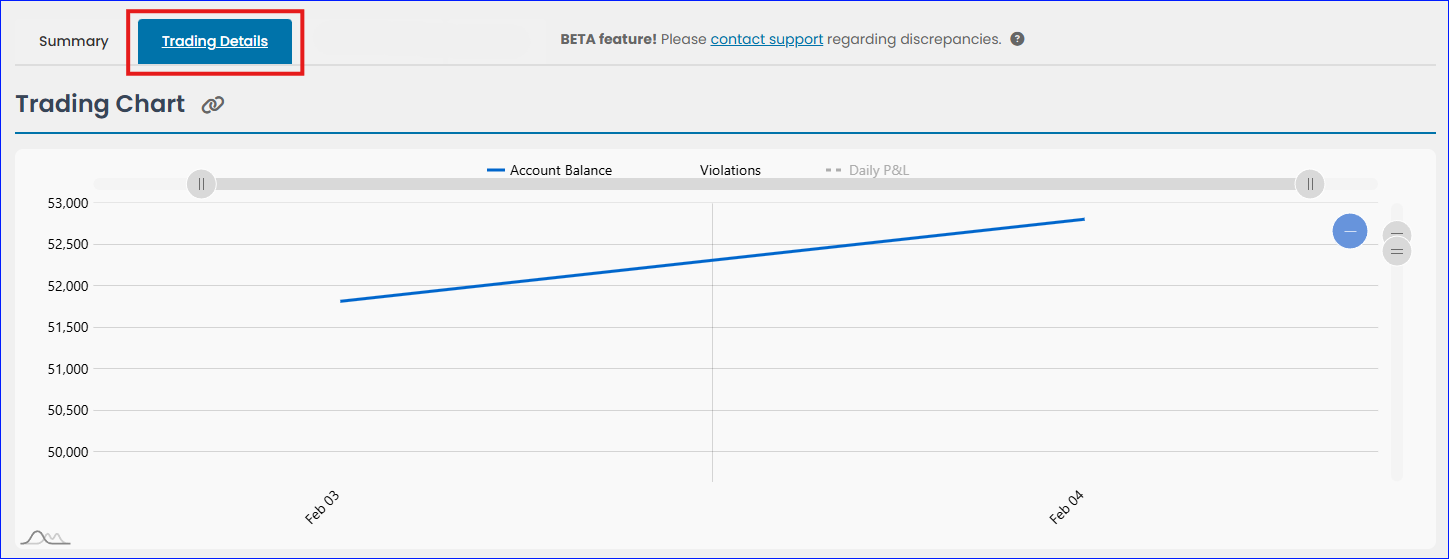
The Trading Details tab shows additional details for each account, including a trading chart, a breakdown of your trading sessions by day, and any violations or adjustments applicable to the account:
Affiliate, Payout Method, Address
Accessing the Affiliate Program
For general information about Apex Trader Funding’s Affiliate Program, visit the Apex Trader Funding Affiliate Program page. Alternatively, you can access this information directly from Apex Trader Funding’s Home Page by scrolling to the bottom and selecting the AFFILIATES link under the RESOURCES section of the ATF landing page.
Commission Payout Schedule
Apex Trader Funding maintains a transparent and structured commission payout schedule for its referring affiliates:
- Monthly Reports: Commission reports detailing earnings from the previous month are generated on the first day of each month. For example, commissions earned from August 1-31 will appear in the report generated on September 1.
- Payout Timeline: Payments are processed by the 15th of the current month following the report generation.
- Processing Time: Once released, payouts typically take 3-7 business days to reach your bank account. It is important to note that different financial institutions may vary in processing times.
Important: Do not submit a support ticket regarding the status of your funds until 7 business days after the payment has been released. This allows sufficient time for the transaction to reflect in your account.
Minimum Affiliate Payout Requirements
Apex Trader Funding requires a minimum payout balance of $1000. If your monthly commissions do not meet this threshold, the amount will carry over to subsequent months until the total reaches $1000. For instance:
- June Commission: If you earn $300 in June, no payout will occur on July 15 since the total is below $1000.
- July Commission: Earning an additional $800 in July brings the cumulative total to $1100, which will be paid out on August 15.
This policy applies uniformly across all plans, including Tradovate, Rithmic, and WealthCharts.
Payout Methods
Apex Trader Funding has introduced a new payout system for Referring Affiliates and Performance Account Contractors. To ensure timely and accurate payments, follow these guidelines:
- Update Payout Information: It is crucial to update your payout method with accurate information, especially for ACH payments to U.S. bank accounts. Incorrect details can delay or prevent payouts.
- Discontinued Services: Apex no longer uses Wise and DEEL for payouts. All international payouts are managed through the designated payment service provider, Plane.
- Payment Form Completion: Ensure the entire payout form is filled out correctly. Pay attention to distinguishing between Wire Transfer and ACH routing numbers.
- Company Payouts: If requesting a payout for a company, enter the Full Company Name in the “First Name” field (e.g., ABC Business, LLC.), and the “Last Name” field will be auto-populated.
Important for Non-U.S. Traders
Non-U.S. traders and affiliates must select the INTERNATIONAL OPTION for payouts to avoid processing delays. By opting for an alternative payment service provider, you acknowledge the potential for significant payment delays.
- Invitation Emails: Upon receiving your first international payout, an invitation email from our international payment processor, Plane, will be sent during the processing period. Do not submit a help desk ticket if you do not receive this email immediately, as processing can take up to two weeks.
Updating Payout Method and Address
To ensure timely payouts, affiliates and PA Account Holders must keep their payout methods and addresses up to date:
- Payout Schedules: Refer to Apex’s website for specific payout schedules for PA Account Holders and Affiliates.
- Address Updates: If you need to update your address, submit a support ticket with your complete and accurate address details to the Help Desk.
Maintaining current payout information and adhering to the outlined schedules ensures smooth and timely commission processing.
For further assistance or to make changes to your payout settings, visit the Apex Trader Funding website and navigate to the appropriate sections under AFFILIATES and RESOURCES.
Apex Trader Funding Dashboard Tutorial
Finally, please watch the video below, which provides a detailed walkthrough of the ATF Dashboard.