
Legacy Account Cancelation Policy
- Validity Until Expiration: If you cancel your account or we cancel it due to a declined card, it remains valid until the expiration date. However, the account cannot be renewed once it is canceled.
- No Reinstatement: An account cannot be reinstated once it has been canceled. If you want to continue trading, you’ll need to purchase a new account.
- Consider Before Canceling: Be sure you want to cancel your account, as profits and trading days cannot be transferred or rolled over to a new account. Cancelations are irreversible.
Key Points About Cancelations
| Feature | Details |
|---|---|
| Canceled Legacy accounts stay active until they expire, but renewals are not possible after that. | The account will expire at the end of the current billing period. This action is irreversible. |
| No Reinstatement | Once an account is canceled, it cannot be reactivated. |
| Profits & Days Traded | These cannot be transferred to a new account after cancellation. |
What Happens After Cancellation?
- Your account remains active until the end of the billing cycle, but cannot be renewed.
- Once the rebill date passes, the account can no longer be converted to a PA. You must sign and pay for the account at least one day prior to the rebill date.
- Any profits or trading days accumulated on the account will be forfeited.
Managing Multiple Subscriptions
| Scenario | Action to Take |
|---|---|
| Canceling One Account | Double-check the account name before clicking cancel to avoid errors. |
| Unsure Which Account to Cancel | Contact the Help Desk for clarification before taking any action. |
| Failed Accounts | These remain active unless canceled manually, so cancel them to avoid unintended charges. |
What if I Cancel by Mistake?
- Mistaken Cancelation Is Final
- If you cancel an account by mistake, you will need to purchase a new account.
- Canceled accounts cannot be reactivated or reinstated.
Avoiding Subscription Overcharges
- Accounts in a failed state will remain active and incur charges unless manually canceled.
- Prevent Unwanted Charges: Cancel unused accounts before market close on the day before the renewal date to avoid unnecessary billing.
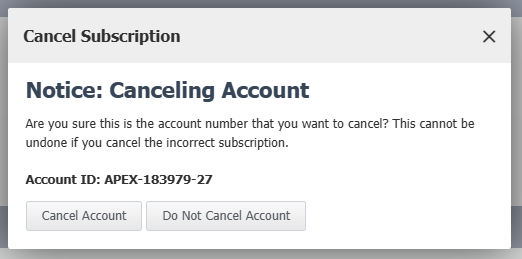
How to Cancel an Account
- Log In
- Access your Apex Trader Funding website dashboard.
- Select the Active Subscriptions Tab
- Click Cancel next to the subscription you wish to terminate.
- Timing is Key
- Cancelations must be completed before market close on the day prior to the renewal date to avoid charges.

Important Notes
- Irreversible Action: Cancelations are final and cannot be reversed. Make sure you’re absolutely sure about your decision before proceeding.
- Evaluation Accounts: If an Evaluation Account is canceled, it must be converted to a Performance Account (PA) before the rebill date. Once the rebill date passes, it can no longer be converted to a PA