
Passing an Evaluation gives you the opportunity to activate a PA of the same size and type as the Evaluation you passed.
For example, passing a 50K EOD Evaluation provides the opportunity to activate a 50K EOD Performance Account. Passing a 50K Live Intraday Trailing Evaluation provides the opportunity to activate a 50K Live Intraday Trailing PA.
After passing the evaluation
Once you reach the profit target and satisfy all Evaluation requirements, your account is reviewed at market close (4:59:59 PM ET).
If the target profit is reported as reached, the Evaluation is then marked as Passed after market close on that day, and will appear in the Passed Evals section of your dashboard after 6 PM ET. At that point, the Passed Evaluation becomes eligible to activate your Performance Account.
Activation Window
You have 7 calendar days from the moment the Evaluation is marked as Passed to complete the PA Activation Fee. The 7-day period begins on the date the account is officially marked as Passed after market close, not when the profit target is reached during the trading session.
Example:
- The profit target is reached at 9:00 PM ET on a Tuesday, the 19th (which is part of Wednesday’s trading session)
- The Evaluation will not be marked as Passed until after the end of the trading session when the market closes, which in this scenario would be Wednesday the 20th, after 6 PM ET
- The 7-day activation period would start on Wednesday
- The last date to activate would be the following Wednesday the 27th by 11:59 PM ET.
If your evaluation is marked as Passed on the final day of your Evaluation access (Day 30), you will still receive the full 7 calendar days to activate your PA even though your original Evaluation access period will have expired.
If the activation fee is not completed before midnight of the 7th calendar day after the evaluation is marked as Passed, the activation opportunity expires and cannot be reinstated. A new Evaluation must be passed to qualify again.
An email notification may be sent once your Evaluation is marked as Passed, but this email is informational only, as activation is completed directly from your dashboard.
How to Activate your PA
To activate your PA, complete the one-time PA activation fee using the Purchase PA link in your Passed Evals tab.
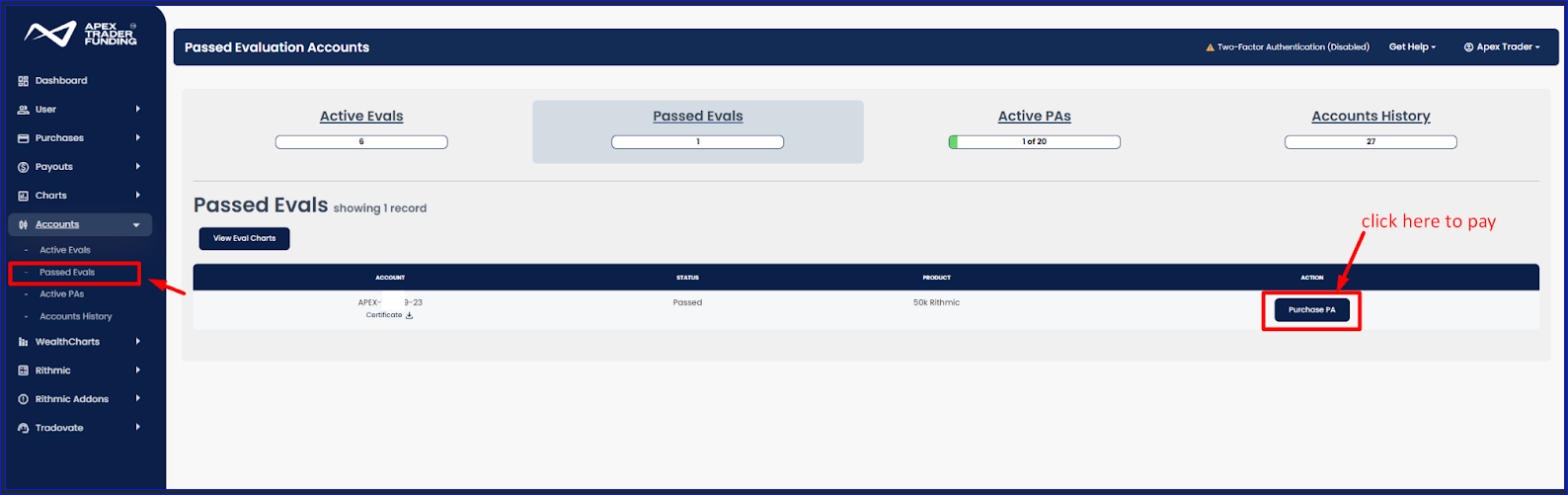
After payment:
- The PA is created using the same login credentials as your Evaluation.
- Account creation can take up to 6 hours.
The automated process begins only after market close on the day you pass. Please allow the full processing window before contacting Support.
If the Purchase PA link is not visible after two full calendar days, you may submit a support ticket.
PA Activation Fees (All Platforms)
The PA Activation Fee is a one-time payment per account. It is not a subscription and does not renew. The fee applies only to the specific Performance Account being activated and cannot be transferred, reassigned, or reversed.
The activation remains valid for as long as the Performance Account remains active.
If a PA is disqualified, liquidated, or closed due to inactivity, the account is permanently closed and market data access is revoked. A new Evaluation must be passed to obtain another Performance Account.
FAQs
What happens if I do not activate my PA within 7 days?
If the activation fee is not completed within 7 calendar days of the Evaluation being marked as Passed, the activation link expires permanently. The opportunity cannot be reinstated. You must pass a new Evaluation to qualify again.
Does the 7-day window start when I hit the profit target?
No. The 7-day activation period begins when the Evaluation is officially marked as Passed after market reopens at 6PM ET, not when the profit target is reached intraday.
What if I pass on the last day of my Evaluation?
You will still receive the full 7 calendar days to activate your PA, even if the original Evaluation access period itself expires. You will not be able to see the passed expired evaluation on your trading platform, but you will be able to see it on your dashboard.
Is the PA Activation Fee a subscription?
No. The activation fee is a one-time payment per account. It does not renew monthly, there is no need to cancel it.
Is the PA Activation Fee refundable?
No, the activation fee is a one-time payment and is not refundable, transferable, or reversible.
Can I transfer my activation to another account size?
No. The activation applies only to the specific Evaluation that was passed and matches the size and type of that Evaluation.
What happens after I pay the activation fee?
Your Performance Account will be created, and will be accessible using the same login credentials as your Evaluation. Account creation may take up to 6 hours.
I paid but do not see my PA. What should I do?
Please allow up to 6 hours for account creation. Contact Support only if the account has not appeared after the full processing window. Accounts purchased or activated after Friday market close will not get created until Sunday 6PM ET.
I passed but do not see the Purchase PA link.
The conversion process begins after market reopens at 6PM ET on the day you pass. If the Purchase PA link is still missing after two full calendar days, you may submit a support ticket.
Can I extend the 7-day activation period?
No. The activation window cannot be extended under any circumstances.
If my PA is later disqualified, do I need to pay again?
Yes. If a Performance Account is disqualified, liquidated, or closed, a new Evaluation must be passed and a new activation fee paid to receive another PA.
Will I lose market data after passing my Evaluation?
If your passed Evaluation is your only active Evaluation account, then yes.
As soon as an Evaluation from the new products is marked as Passed, it is automatically locked to prevent any additional trading. This helps ensure the account cannot be traded after successfully passing.
If that was your only active Evaluation account, you will no longer have market data until you activate your new Performance Account or purchase another Evaluation.