
If you live outside the United States, your payouts will be sent through Plane, a secure international payment platform. Once your first payout request is approved, you will receive an email invitation from Plane to link your local bank account. Be sure to check your spam or junk folder if the email doesn’t arrive within a few days.
What You’ll Need
Before getting started, make sure you have:
- A local bank account in your country of residence
- A government-issued ID or Passport
- Email address (Must be the one used to log in to your Apex Dashboard)
Step-by-Step Instructions
1. Log in to Your Apex Dashboard
Go to https://dashboard.apextraderfunding.com/login and log in with your account credentials.
2. Navigate to “Payout Method”
Once logged in, locate and click the Payout Method tab from the menu located on the left side of your dashboard.
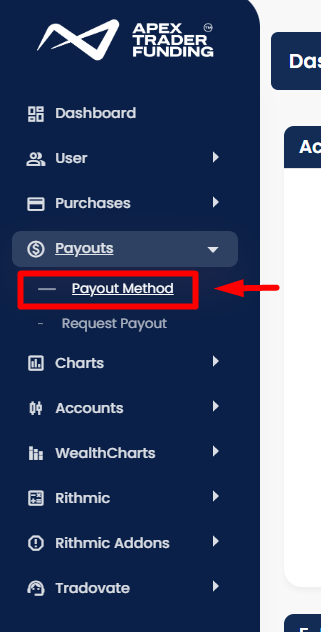
On the pop-up window, read the information, then keep scrolling to the bottom of that page where you can click the “CHANGE PAYOUT METHOD HERE” link.
3. Complete the Required Personal Information Fields
In the payout method section:
- For “US Citizen or US Taxpayer,” select No
- Enter your Government ID Number or Passport Number
- For Payout Type, select International (this is required for all International users)
- Enter your legal First and Last name as it appears on your APEX Profile
- Avoid using special characters or symbols in the name, as this may prevent successful processing.
- Enter your email address
4. Save Your Details
After confirming all information is accurate, click Save to complete your payout method setup.
After your first payout request is approved, you will receive an invitation email from Plane within 1 to 4 business days. Follow the link in that email to set up your Plane profile and link your local bank account. You’ll be ready to receive payouts once your Plane account is linked and active.
If you do not see the email, check your spam or junk folder. Do not submit a Help Desk ticket unless more than 5 business days have passed without receiving the email.
Additional Requirements and Information
Bank Country Must Match Residency
Your bank account must be located in the same country as your declared residency in Apex. For example, if you live in Spain, your bank account must also be based in Spain.
Requests using a bank account from a different country than your country of residence will be rejected. Be sure to update your payout method accordingly if needed.
Tax Information for International Users
- Apex does not issue tax forms to non-US users
- You are responsible for reporting your earnings according to the laws in your country
Note: Apex cannot provide tax advice. If you have questions about local tax requirements, please consult a qualified tax advisor. The Help Desk is unable to assist with tax-related inquiries.